This rugged Windows tablet handles mud and rain – but didn’t impress with the basics
Follow ZDNET: Add us as a preferred source on Google.
While laptops and PCs dominate the office space, they’re not always the best form factor for taking compute power out of the comfort and safety of the workspaces. This is where tablets come into play. They’re not only more portable than laptops or desktops, they’re far easier to ruggedize.
Sure, performance isn’t as good as what we’d expect from a more traditional system, but thanks to modern processors, the power that can be packed into a tablet is still pretty amazing.
Also: Cable, cords, and adapters I never throw away – and why these accessories are worth saving
The Getac G140 is a tablet that’s been built from the ground up to be powerful enough to run Microsoft’s Copilot+ AI tools, but also tough enough to survive rough handling by Mother Nature.
Best tablet deals of the week
Deals are selected by the CNET Group commerce team, and may be unrelated to this article.
The specs
The G140 features a 14-inch 1920 x 1200 IPS LCD touchscreen and an AMD processor from the Ryzen AI 5 and Ryzen AI 7 lines, even the Pro variants, between 16GB and 64GB of DDR5 RAM, and up to 2TB of PCIe NVMe SSD storage.
Also: I’ve tested dozens of power stations – here’s how I’m preparing for summer blackouts
Powering this are dual hot-swappable batteries, a bunch of built-in ports, a DisplayPort, USB 3.2 Gen 2 Type-A port, Gigabit Ethernet, and audio in/out, along with the option to add HDMI 2.1 and two USB 2.0 Type-A ports. On the top of the tablet is a port that accepts an optional barcode reader, serial port, HF RFID reader, or USB 2.0 Type-A port.
All the ports are well protected from the elements.
Adrian Kingsley-Hughes/ZDNET
Options galore. There’s also the obligatory front- and rear-facing cameras, with the front-facing camera featuring a privacy/protection cover that slides over it when you want privacy or worry something’s going to scratch the lens.
My review unit featured an AMD Ryzen AI 7 Pro CPU with a Radeon 860M GPU, 32GB of RAM, and 500GB of storage, which is near the top of the G140 spec sheet.
Built to last
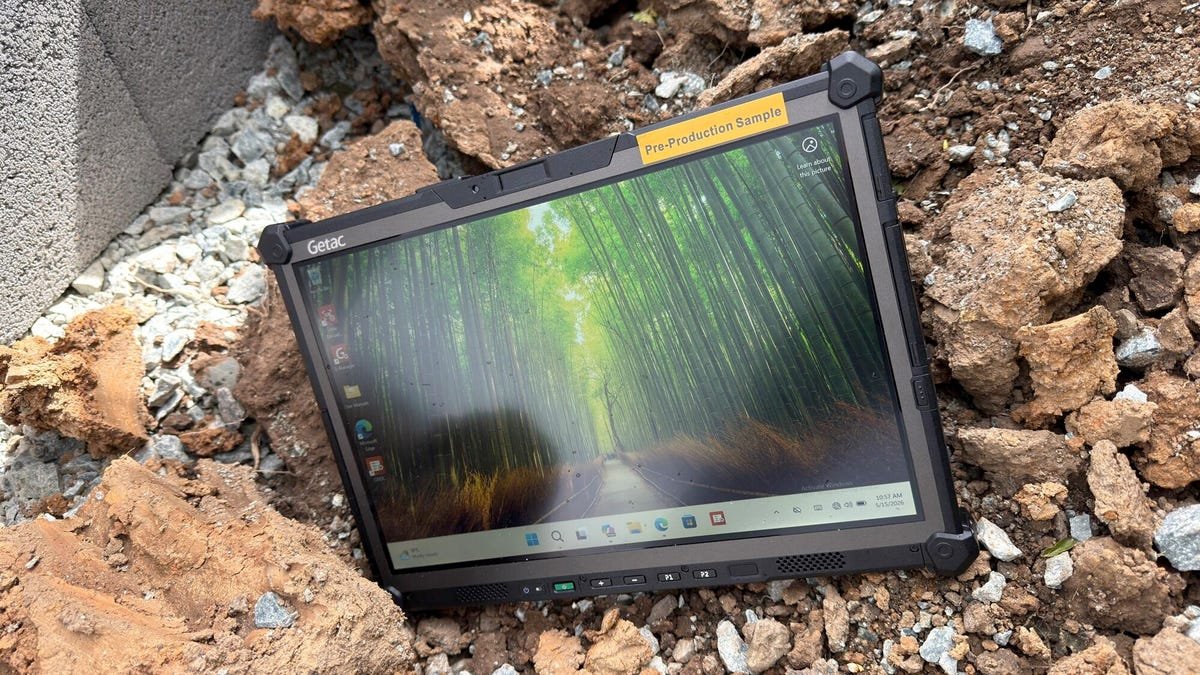
All this tech is packed into a shell that’s been designed to pass MIL-STD-810H environmental tests and MIL-STD-461G electromagnetic compatibility tests, and is rated IP66, so it’s fully protected against dust ingress and high-pressure water jets from any direction.
Rain is nothing for the G140.
Adrian Kingsley-Hughes/ZDNET
The tablet measures 13.3 x 9.4 x 0.9 inches and weighs 3.95 pounds, so it’s a pretty hefty weight to hold in one hand. It’s also certified for safe use in hazardous locations with explosive atmospheres, as well as in marine environments where salt fog and corrosion are a real problem. Overall, it’s ideal for harsh outdoor conditions.
The question of price
All this hardware runs Windows 11 Pro, and it runs very smoothly, as I’d expect for a tablet that’ll set you back as much as $4,000. It also runs Microsoft Copilot+ features smoothly thanks to the Ryzen AI chip having an NPU capable of running at 50 TOPS.
Also: This ‘cardputer’ sits between the Raspberry Pi and Flipper Zero – but it’s uniquely better
But things take a bit of a dive when we look at the benchmarks. In Cinebench 2024, it scored a 433 in multi-core performance and a 92 in single-core performance. This isn’t all that impressive (my iPhone 17 blows it away), but remember that it is a full, no-compromise Windows system you can hold in your hand. Almost — it does weigh about the same as a watermelon.
The Cinebench 2024 score is also at the low end.
Adrian Kingsley-Hughes/ZDNET
Pros and cons
Performance-wise, I like the G140. Sure, it’s an underdog when it comes to benchmark results and won’t win any bragging rights. But it’s fast enough, and that’s what counts. It’s built for work, not running AAA games. The screen is also just good enough, even though at 1,000 nits, it’s a little bit on the dim side in bright sunlight.
This could be down to the protective film that Getac has applied to the display, but it has very wide horizontal and vertical viewing angles, which is great, and does a great job of resisting smudges and dirt. I also like the hot-swappable batteries. This is great for situations where you can’t be tied to a charging cord.
The hot-swappable batteries are a great idea.
Adrian Kingsley-Hughes/ZDNET
Ruggedness is also top-notch. I’m not going to drive a mini digger over a this tablet, but I did give it a very good workout. It got used in the rain, put down in dirt and mud, dropped, and abused in a way that these sorts of devices get abused.
The downside of the ruggedness is the weight. It’s a hefty bit of kit. Getac has preempted this with various palm holders for the G140, but there’s no getting past how heavy it is to hold.
Also: I set up a $4 router reboot timer, and it’s made my internet reliably faster
It’s also big. I know that’s a bit obvious — I mean, it is a 14-inch tablet — but this is bigger than you expect thanks to the oversized bezel and bumpers. It’s pretty much the size of two 16-inch MacBook Pros stacked on top of each other.
The buttons on the bezel take some getting used to as well. I found myself constantly pressing them by accident, and it wasn’t something that got better with more use. I could disable the buttons, but that seemed like admitting defeat.
I just couldn’t get used to the placement of these buttons.
Adrian Kingsley-Hughes/ZDNET
ZDNET’s buying advice
If you need a rugged Windows 11 Pro tablet that you can leave in the rain, drop into mud, and use on an oil rig without worrying about salt eating it or causing an explosion, the Getac G140 is perfect. But this is a niche device. It’s expensive, absolutely massive, and performance is limited.
You can definitely buy cheaper, lighter, and more powerful tablets, but these would quit at the first drop or rain shower. You can also find cheaper rugged tablets, but you lose on performance and all the optional extras that you can add.