Acer Swift Air 14 vs. MacBook Neo: I compared both budget laptops – this model wins
Follow ZDNET: Add us as a preferred source on Google.
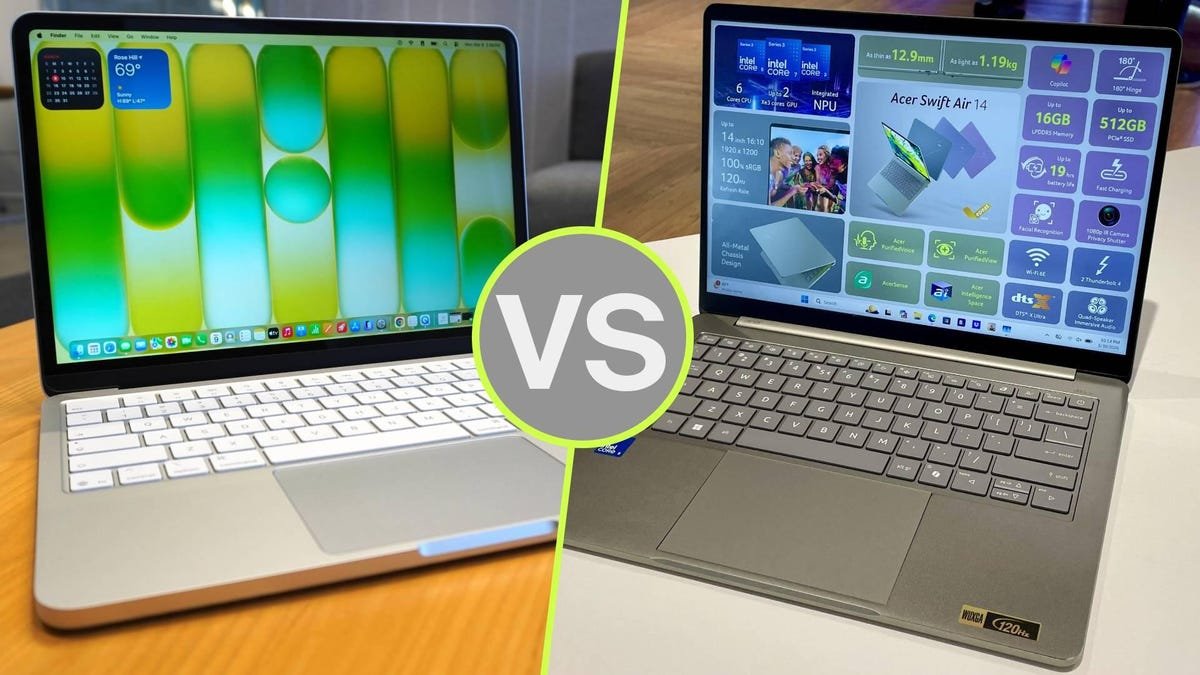
Of all the laptops that were announced at Computex 2026, Acer’s Swift Air 14 brought some much-needed color and affordability to a barrage of very powerful (and very expensive) high-end PCs. Starting at $699, the Swift Air 14 is a competitively priced laptop with competitive specs that doesn’t feel cheap.
Also: Dell XPS 13 (2026) vs. MacBook Neo: I compared both budget laptops, here’s which one I’d buy
Set to be released later this summer, the Swift Air 14 is just one of a few Windows PCs that are direct responses to Apple’s MacBook Neo — its $599 laptop that disrupted the budget laptop market so thoroughly that PC brands were forced to respond within a matter of months.
The Swift Air 14 comes in unique colors, features upgradeable storage (up to 1TB), and has a large, fast-charging battery. How does it compare to the Neo? Here’s the breakdown based on specs, keeping in mind I’ve only gone hands-on with the Swift Air 14 and haven’t tested it over an extended period of time.
Specifications
|
Apple MacBook Neo |
Acer Swift Air 14 |
|
|
Display |
13-inch non-touch, 60Hz refresh, 2408 x 1506 resolution, 500 nits |
14-inch non-touch, 120Hz refresh, 1920 x 1200 resolution, 350 nits |
|
Weight |
2.7 pounds |
3.0 pounds |
|
Processor |
Apple A18 Pro |
Up to Intel Core 7 processor 350 |
| RAM/Storage | 8GB / 256GB-512GB | Up to 16GB / Up to 512GB (upgradeable to 1TB) |
| Battery | 36.5 Whr (up to 16 hours) | 70 Whr (up to 19 hours) |
| Camera | 1080p FaceTime HD camera | FHD IR camera |
| Connectivity | Wi-Fi 6E, Bluetooth 6 | Wi-Fi 6E, Bluetooth 5.3 |
| Price | Starting at $499 for students, $599 general | Starting at $699 |
1. Battery and endurance
Winner: Acer Swift Air 14
Both devices are very energy-efficient. But the Swift Air 14 has a larger cell (70Whr versus the 36.5Whr on the Neo), which Acer says lasted up to 19 hours during its video playback test. This is in part thanks to Intel’s Core 7 “Wildcat Lake” series processor, built specifically to power thin-and-light, marathon-battery laptops.
The Swift Air 14 is also extremely fast at charging, getting up to 50% in just 30 minutes — that’s smartphone-level charging that extends its longevity even further.
Also: I saw the first Nvidia RTX Spark laptops – these 4 models will lead the new ultrabook boom
I should note that the Neo’s battery is, on paper, more efficient, but the Swift Air 14 simply has more to draw from, potentially allowing for more wiggle room for users who are exceptionally good at managing their battery power. I’d estimate this equates to 1-2 full days of work in practice.
2. Display
Winner: MacBook Neo
The display on the Neo looks great for its price point, and compared to the Acer Swift Air 14, it beats it. It’s brighter (500 nits versus 350), has better resolution (2408 x 1506 on the Neo versus 1920 x 1200 on the Acer), and features Apple’s liquid retina technology for a vibrant, crisp image you could mistake for a much more expensive laptop.
However, the display on the Swift Air 14 is not bad. It has a faster refresh rate (120Hz versus 60 on the Neo), and even though it’s a slightly lower resolution, it’s a full inch larger (14 inches versus 13 inches).
Camera and video call experience
Winner: MacBook Neo
One of the best things about the MacBook Neo is how well it does what the Air and Pro do. That includes any video call experience on FaceTime, Zoom, Teams, or Google Meet. The Neo has a 1080p FaceTime HD camera that’s very good in general — not just for laptops in this price range. The FHD camera on the Swift Air 14 won’t compare, both in terms of raw camera quality and integration with your smartphone.
3. Ports and I/O
Winner: Acer Swift Air 14
The Swift Air 14 has a competent set of ports that beats the Neo, hands down. You’ve got two USB-C Thunderbolt 4 ports (the Neo only has one USB 3 and USB 2), plus a USB-A port and 3.5mm audio jack. Translation: the Swift Air 14 has more ports, and they’re faster. It’s a standard I/O loadout you’d find on any typical midrange PC, whereas the Neo’s I/O setup is distinctly more “budget”.
4. Value
Winner: MacBook Neo
It comes down to this: the MacBook Neo for $499 for students is the best bang-for-buck laptop deal on the market right now. Hands down. If you’re an educator or student, there’s not much else in the same price range that brings the same quality experience, features, and build, and it’s as simple as that.
Also: Windows rivals to MacBook Neo are here – but I’m more excited for Google’s response
The Acer Swift Air 14 starts at $699 and has comparable hardware, with a little more RAM and storage options (the Swift Air 14 is upgradeable to up to 1TB of storage — double the Neo), but if sheer affordability is what you’re after, the Neo is unbeatable. In fact, I’d like to see the starting configuration of the Swift Air 14 brought down slightly, and suggest watching for sale pricing if you’re looking to buy when it’s available later this summer.
Writer’s choice
As previously mentioned, I haven’t had a chance to use the Acer Swift Air 14 for an extended period, but based on my limited time with it, I’m confident it’s a solid contender to the MacBook Neo. It has better/faster I/O, more storage and RAM options, and a colorful palette, but it’s still a Windows PC, and 8GB of RAM on a Mac just isn’t the same as on a PC.
As of now, I’d still go with the Neo because its performance, user experience, and display are just so good for the price. The Neo is also cheaper than the Swift Air 14, which is hard to believe since it competes with it — and even beats it — in multiple categories. As of now, Windows PC manufacturers have yet to fully address the $499 student pricing on the Neo.
Also: After using MacBook Neo, it’s clear Windows needs to rethink its PC strategy (and fast)
Sure, the Neo has trade-offs (no keyboard backlighting, fewer ports), but it makes up for them with Apple’s rich ecosystem of integrations, a very good trackpad, solid performance, and better value.